
Donec efficitur, ligula ut lacinia
viverra, lorem lacus.
Donec efficitur, ligula ut lacinia
viverra, lorem lacus.
Most portrait problems aren’t about lighting. They’re about what’s behind the subject. A distracting background competes with the face — and no amount of post-processing fully fixes a bad choice made at the time of capture. This guide covers what actually works, why it works, and how to pull it off without overcomplicating the process.

A white background reads as clinical or corporate. A dense forest feels intimate and slightly wild. A crumbling brick wall in late-afternoon light hits somewhere between editorial and documentary. The background isn’t passive — it’s part of the composition, whether you planned it that way or not.
In 2026, visual literacy has gone up across the board. Social media has trained both clients and audiences to read images faster. A background that looked fine five years ago now reads as dated or lazy if it has no relationship to the subject. The backdrop for portrait work carries more interpretive weight than it used to.
The rule most photographers arrive at eventually: the background should support, never compete. That means no equally-sharp elements at the same tonal value as the subject’s face. Use depth of field. Use distance. Use contrast — tonal, color, or both.
One test worth applying on set: squint at the frame. If your eye goes anywhere except the subject’s face first, the background is too strong. That’s not a law — editorial and conceptual portraits sometimes want the environment — but for most client work, it’s a reliable gut check.

Environmental portraits place the subject within a context that says something about who they are — a chef in a kitchen, a craftsman in a workshop, a musician backstage. The background isn’t decoration; it’s narration. These backgrounds tend to work because the relationship between subject and setting creates meaning that a studio backdrop can’t fake.
Fields, forests, mountains — natural landscapes give portraits scale and atmosphere. The challenge is light. A woodland location that looked moody and soft on a cloudy Tuesday looks completely different at noon on a clear day: harsh shadows, blown-out highlights, unflattering contrast. Shoot during golden hour or in open shade. If you’re near rocky beaches or dramatic coastal scenery, low tide and late afternoon tend to give the most usable light.
Urban areas — alleys, murals, industrial facades, doorways — are underused. A textured wall in an urban setting gives you graphic background elements without requiring you to haul any gear. Find spots where the architecture creates natural frames: a doorway, a colonnade, a recessed entrance. Children’s playgrounds, by contrast, are almost always too busy and too colorful — not recommended unless the brief specifically calls for it.
Water and sky both desaturate naturally, which helps clean up the frame behind the subject. Shoot with the horizon low — just above or just below the subject’s shoulders — and the ocean becomes a graphic wash of color rather than a literal seascape. Rocky beaches give more visual texture than flat sand, which tends to pick up harsh reflections in direct sun.
Indoor settings offer control. You’re not fighting wind, unpredictable cloud cover, or changing sun angles. The tradeoff is usually space: most indoor environments are smaller than they look, and getting enough distance between subject and background to achieve any meaningful blur requires either a longer lens or a bigger room than you expect.
Seamless paper rolls and muslin remain the standard for a reason — they’re consistent, clean, and fast to work with. Seamless paper in mid-gray is the most versatile single option a portrait photographer can own. It goes dark with negative fill, bright with a background light, and sits naturally at almost any tone in between. Muslin gives texture, which is sometimes exactly right and sometimes exactly wrong depending on the subject.
Textured backgrounds — exposed brick, raw plaster, shiplap, concrete — have remained consistently popular across multiple style cycles because they photograph well. The texture is visible when needed but recedes with enough distance and a moderate aperture. A hotel lobby or a cafe with interesting interior architecture can give you location variety without the logistics of outdoor shooting. Ask for permission early; most businesses are receptive if you explain the project clearly.
Fabric, newspapers, tinfoil crinkled and smoothed onto a board, a bookshelf deliberately out of focus — DIY backgrounds work best for conceptual work or product photos that need a specific aesthetic. They rarely pass for professional in a corporate headshot context, but in editorial or personal work they give you control over color and texture that you can’t get from stock backdrops.
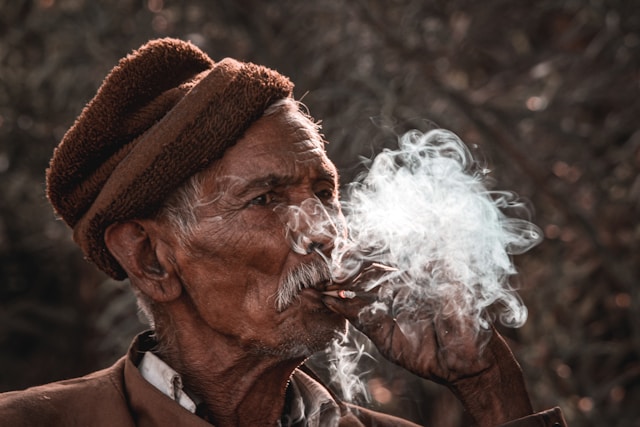
Bokeh — the quality of out-of-focus areas — is determined by aperture, distance between subject and background, and focal length. To get a soft, slightly out of focus background: shoot at f/1.8–f/2.8, put 10–15 feet between subject and the tree line or hedge behind them, and use an 85mm or longer lens. Leaves and flowers work especially well because their shapes remain recognizable even at f/1.8, giving the image depth without confusion.
White backgrounds are harder to execute than they look. The background needs to be lit separately — usually one to two stops brighter than the subject — or it reads gray rather than white. A reflector alone rarely gets you there. For clean commercial white-background portraits, a separate flash or strobe pointed at the seamless paper is non-negotiable. Natural light on a white background without supplementation results in a slightly dirty, off-white tone that reads as underexposed.
Solid color backgrounds emphasize the facial features by removing all competition. The color choice matters: neutral tones (gray, beige, navy) read as professional; saturated colors (deep red, forest green, cobalt) read as editorial or creative. For headshots, most clients will ask for neutral — but solid color backgrounds in unexpected tones have been increasingly popular in personal branding photography since 2023 and show no sign of slowing down.
A black backdrop for portrait work is essentially a Rembrandt setup applied to photography. The black background isn’t just dark — it absorbs light and eliminates environmental context entirely, putting 100% of the viewer’s attention on the subject. Use a single key light positioned 45–60 degrees to one side, no fill, and let the shadows go deep. The result is moody, high-contrast, and striking. One practical note: the subject’s clothing matters more on a black background than on any other — light tones pop, dark tones disappear.
Brick, wood paneling, and concrete walls share a useful property: they photograph well at almost any aperture. Unlike natural foliage, which can look chaotic when sharp, textured walls stay legible and graphic even in focus. Use them when you want the environment to feel present — when the background is part of the story — and add distance when you want to soften them into a suggestion.
Leaves and flowers as background elements are essentially free. A park, a garden, any reasonably green outdoor space gives you this option. The key is separation: enough distance and enough blur that the flowers read as color and softness rather than specific botanical species. Tight bokeh on individual blooms looks deliberate and polished; identifiable species in sharp focus looks like an accident. Golden hour light through foliage adds warmth that works with almost any skin tone.
Shooting up into the sky sounds simple, but it flips the lighting problem: the sky is the brightest element in the frame, which means the subject’s face is almost certainly underexposed without intervention. Use a reflector or a flash to bring the subject’s exposure up to meet the sky. A circular reflector angled toward the face from below solves the problem at minimal cost and no power requirements — photographers often underestimate how much a $40 reflector changes an outdoor portrait.
For editorial and creative work, DIY backgrounds create textures and looks that no commercial photography backdrop can replicate. Crinkled aluminum foil behind a subject lit with a single flash gives you a fractured, high-contrast abstract background. Layered fabric in contrasting tones creates depth without physical depth. These backgrounds are time-intensive to construct and very specific in application — but for the right brief, nothing else comes close.
Urban landmarks — a famous bridge, a distinctive building facade, a recognizable skyline — immediately locate the portrait in a specific place and time. That context is an asset for some clients (travel bloggers, tourists, residents who want a connection to their city) and irrelevant for others. Check location permissions before shooting; many iconic landmarks in major cities have commercial photography restrictions that don’t apply to personal use but do apply to paid assignments.
Suburbs and urban areas have textural richness that often goes overlooked: parking structures, overpasses, loading docks, painted utility boxes. These locations work because they’re graphic and unexpected. A portrait taken in front of a weathered industrial wall looks entirely different from the same subject against seamless paper — same person, different story. For lifestyle and personal brand photography in 2026, authentic-feeling environments like these consistently test better with audiences than obviously staged studio setups.

For corporate headshots and formal portraits, the background should communicate stability and professionalism. Good backgrounds for headshots in this category: mid-gray or dark charcoal seamless paper, blurred office interiors (a frosted glass partition, an out-of-focus shelf of books), or a shallow-depth exterior shot that implies context without naming it. Avoid anything with visible branding, patterns, or strong colors — those elements compete in ways that clients rarely want in formal contexts.
Lifestyle work benefits from environmental context that feels real rather than constructed. A cafe corner, a home bookshelf, an outdoor table with afternoon light — these backgrounds work because they’re plausible. The subject appears to exist in a world, not in a studio. The risk is clutter: too much environmental detail and the image reads as documentary rather than portrait. Edit the real environment before you shoot — move the clutter, tidy the surface, choose the angle that gives you the cleanest background within the real space.
Creative portrait backgrounds are limited only by the brief and the budget. Projection mapping onto the background or the subject themselves has become more accessible in 2026 with affordable compact projectors. Color gels on a seamless background create vivid, atmospheric color without requiring a location. These approaches require more setup time and more post-processing, but they produce images that stand out from standard studio work.
Headshots have a narrower acceptable range than other portrait work. The face needs to be the undisputed focal point, which means backgrounds that are clean, slightly blurred, and tonally separated from the subject’s skin and hair. Options that reliably work:
What doesn’t work: busy patterns, strong colors at full saturation, anything that introduces narrative complexity a headshot doesn’t need.
The background should tell a consistent story with the subject. A painter photographed against a pristine white wall is a clean studio portrait — that’s fine. The same painter photographed in their studio, surrounded by their materials and work, is an entirely different image. Neither is wrong. The question is what the photograph is supposed to communicate, and whether the background supports that or contradicts it.
Depth of field is one of the most misunderstood tools in portrait photography. A shallow depth of field doesn’t automatically mean good bokeh — it means less in focus. Whether that blur looks good depends on what you’re blurring. Leaves and flowers blur beautifully. High-contrast geometric patterns blur into distracting shapes. Know what’s behind your subject and decide whether blur helps or hurts before you set your aperture.
Props in the foreground — a branch, a piece of fabric, a glass element — add depth and frame the subject without changing the background itself. Shooting slightly through a foreground element at wide aperture creates a sense of layers that makes the image feel dimensional. This is a technique that takes no additional equipment and can be done in almost any location.
Even a good background often needs adjustments. Background slightly too bright? A targeted adjustment layer can bring it down without touching the subject. Distracting element in the corner? Clone it out. Color of the background pulling the wrong undertone into the overall palette? A hue/saturation mask can shift it selectively. Post-processing the background isn’t about hiding bad decisions — it’s about optimizing good ones.
In 2026, the tools available for background editing have improved substantially. AI-based subject masking — available in Lightroom, Photoshop, Luminar Neo, and several mobile editors — has become fast enough and accurate enough to use routinely rather than as a last resort. The mask quality in these tools is now good enough for commercial work in most circumstances, though complex hair-against-sky situations still require manual refinement.

Background decisions in portrait photography aren’t a formula — they’re a judgment call made with specific knowledge about the subject, the brief, the location, and the light available at that moment. The photographers who consistently produce strong portrait work aren’t the ones who memorized a list of good backgrounds. They’re the ones who understand why those backgrounds work and can make the same quality of decision in new situations.
Start with what’s accessible. Scout your locations. Understand how different backgrounds interact with light and aperture. And treat post-processing as a refinement tool rather than a rescue operation. That sequence — good decisions at capture, refined in post — produces the most consistently strong results.
There isn’t one universally best background for a portrait — it depends on the style and purpose of the image. For corporate headshots, a clean mid-gray or blurred neutral interior works best. For editorial and creative portraits, textured walls, natural environments, or solid color backdrops tend to be more appropriate. The best portrait background is the one that supports the subject without competing for attention.
Start with the subject and the intended use of the image. Ask whether the background should provide context (environmental portrait), be neutral (headshot), or add creative atmosphere (editorial). Then consider the available light — outdoor backgrounds change dramatically with light conditions — and ensure there’s enough tonal or color separation between the subject and the background to keep the face as the clear focal point.
Good backgrounds for headshots are clean, slightly out of focus, and tonally separated from the subject’s skin and hair. Mid-gray seamless paper, blurred architectural elements (glass partitions, concrete walls), and shallow-depth outdoor greenery all work well. Avoid high-contrast patterns, strong saturated colors, and anything that introduces visual complexity a headshot doesn’t need.
Yes. AI-based background removal tools available in Luminar Neo, Adobe Photoshop, and other software have become highly accurate. Results are best when there’s good separation between the subject and the original background in terms of tone or color. Complex edges — fine hair against a similarly-toned background, for example — still require some manual refinement even with the best current tools.
Adobe Photoshop and Lightroom remain the industry standard for professional portrait editing, with strong AI-based masking built into both. Luminar Neo is a compelling alternative that offers background-specific tools — including bokeh simulation and background replacement — with a faster learning curve. For mobile editing, Lightroom Mobile and Snapseed cover most common background adjustments adequately.
